
Tinker (MUSE Extension)1.3.004 - Google Play
You'll be able to see results in few seconds.
Publisher Description
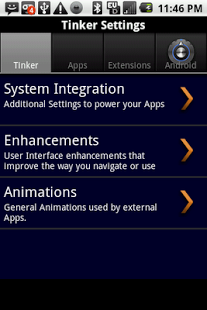
Do not download this if you do not have an application that says "Enhanced by Tinker" in its market description. This app is not meant to be used by itself. And now... one to the description.
Tinker is the fastest, easiest way to manage your settings for your phone and its "Tinkerable" apps. Over the next several weeks, there are at least 8 other apps that will manage all of their settings via this one app. The first consumer product using Tinker will be released on Wednesday, today. (Thanks to everyone who was patient and waited!!)
Those who are already familiar with this product or interested in seeing how it works should download Tinker and begin familiarizing themselves with it. Others should wait until some of the other products are released over the next month.
(None of our Applications are ad-supported.)
(This app is brand new and as we release the other apps of this family, is scheduled for many updates. Please be patient for the first month of release. Thank you!!)
**Features**
-> One simple interface for multiple app settings (preferences)
-> Tabbed, flingable interface for easy navigation
-> Application management directly through Tinker
-> Android Settings included in interface (on some phones)
-> Uses Intent Routing to allow apps to respond to their own Install and Update events
-> Uses approx. 2.5MB of RAM to manage multiple applications
-> Backup, Copy, Restore the settings for all Tinkerable apps.
-> Keeps Settings separate from Package. Settings will not be removed for an app, even if uninstalled, unless you remove them.
-> Manage other MUSE Extensions for apps on an app by app basis. (i.e. enable for this app, disabled for that)
Enhanced by:
-> Agent - To utilize package contact directory (via Menu), and registered apps directories (via Long Press).
-> Airbrush - To implement custom styling
-> Pigeon - Allows sending of application market links (via Long Press)
Planned Extensions will add the ability to:
-> Allow users to send settings to other phones via SMS and EMail
-> Have a customizable skin
-> Have multiple configurations for different user, network, or battery profiles.
**Known Issues**
-> The Backup mechanism is not working due to previous SQL error. This has been found and is being fixed.
-> Extension management is off until the Cursor Error fix is confirmed as working.
**For Developers**
Tinker is the first (and primary) Extension in the MUSE Platform for Android that allows other apps to work with it. The MUSE Platform currently consists of 8 applications that are currently being dispensed to the public. Apps that integrate Tinker functionality are generally smaller and faster. Most importantly, developing with Tinker does not require Tinker to be installed on the device.
Communicating with Tinker is much simpler than coding a Preferences or SharedPreferences interface. Most of the work is contained within the application's manifest. Costs for a developer's license are less than two hours of an average developer's wage. And did we mention that you can develop with Tinker without paying a penny until you publish your app?
Tinkerable applications also share the benefit of free targeted marketing (via the Android Market and our website). Learn what cooperative programming is really about! See how applications can work together without requiring each other's presence. Contact us by phone or email if you are a developer and interested in using any of our products.
About Tinker (MUSE Extension)
The company that develops Tinker (MUSE Extension) is nTouch Software, LLC. The latest version released by its developer is 1.3.004.
To install Tinker (MUSE Extension) on your Android device, just click the green Continue To App button above to start the installation process. The app is listed on our website since 2012-02-09 and was downloaded 0 times. We have already checked if the download link is safe, however for your own protection we recommend that you scan the downloaded app with your antivirus. Your antivirus may detect the Tinker (MUSE Extension) as malware as malware if the download link to com.ntouch.MUSE.Tinker is broken.
How to install Tinker (MUSE Extension) on your Android device:
- Click on the Continue To App button on our website. This will redirect you to Google Play.
- Once the Tinker (MUSE Extension) is shown in the Google Play listing of your Android device, you can start its download and installation. Tap on the Install button located below the search bar and to the right of the app icon.
- A pop-up window with the permissions required by Tinker (MUSE Extension) will be shown. Click on Accept to continue the process.
- Tinker (MUSE Extension) will be downloaded onto your device, displaying a progress. Once the download completes, the installation will start and you'll get a notification after the installation is finished.
Program Details
System requirements
Download information
Pricing
Version History
version 1.3.004
posted on 2012-02-09
version 1.3.004
posted on 2012-02-09
Several fixes and updates
Disclaimer
Official Google Play Link
We do not host Tinker (MUSE Extension) on our servers. We did not scan it for viruses, adware, spyware or other type of malware. This app is hosted by Google and passed their terms and conditions to be listed there. We recommend caution when installing it.
The Google Play link for Tinker (MUSE Extension) is provided to you by apps112.com without any warranties, representations or guarantees of any kind, so access it at your own risk.
If you have questions regarding this particular app contact the publisher directly. For questions about the functionalities of apps112.com contact us.
